You're in!
AI at Work
Thank you for your purchase. Your report is ready for download. Start with Section 1 and try the first action step today. Most readers find the biggest improvement comes from building the daily workflow in Section 6. If you have questions, refer to the FAQ inside the report.
Your complete guide is ready below. Start with Part 1 and work through each part in order. Everything you need, including the tools and resources mentioned inside, is linked right where you need it.
What's inside
8 Parts
- Part 01Talk to AI Like a Colleague, Not a Search Engine
- Part 02Write Faster and Better With AI as Your Drafting Partner
- Part 03Research Smarter Without Drowning in Tabs
- Part 04Plan Projects and Break Down Overwhelming Tasks
- Part 05Make Clearer Decisions With AI as Your Thinking Partner
- Part 06Build Your Personal Daily AI Workflow
- Part 07Common Mistakes That Waste Your Time
- Part 08Level Up Your Results Without Learning Advanced Techniques
Your guide
-
Step 1
Talk to AI Like a Colleague, Not a Search Engine
In shortReset the reader's default behavior from one-line questions to context-rich conversations that produce useful, specific output.
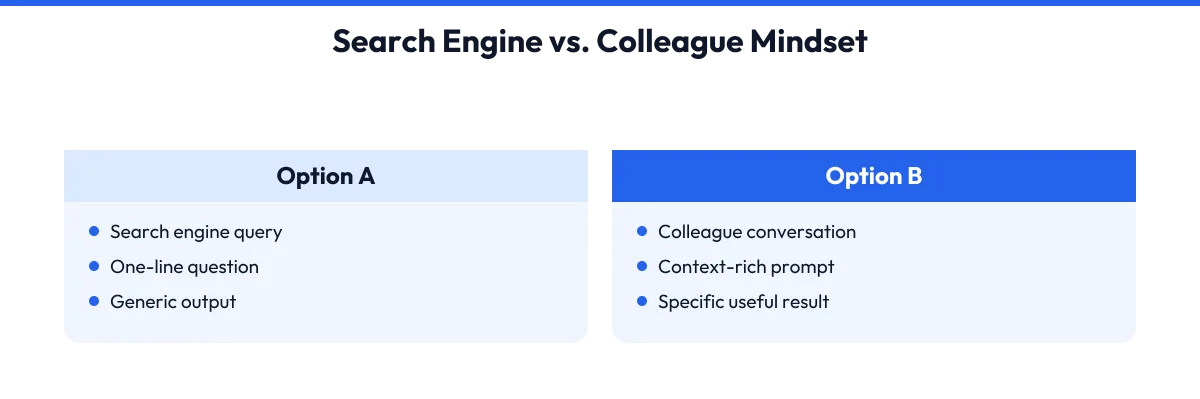
The biggest mistake people make with AI is treating it like Google. You type "write a marketing plan" and get a bland, generic outline that could belong to any business. Then you decide AI is overrated. The fix is simple: give context before you ask for output.
Think of AI like a new employee who is smart but knows nothing about your business. Would you tell a new hire "write a marketing plan" and walk away? No. You would explain your product, your customers, your budget, and what you need the plan to do.
Do the same with AI. Start every conversation with three pieces of context: who you are, who you are talking to, and what you want to achieve. For example: "I run a small accounting firm with six clients in the construction industry. I need to write a monthly newsletter that keeps me top of mind without sounding salesy." That single paragraph changes everything.
The AI now understands your world and can give you relevant, specific help. Another key shift: stop expecting perfect answers in one shot. Treat it like a back-and-forth conversation. Ask, review, add detail, ask again. This is called iterative prompting, and it is the difference between generic fluff and something you can actually use.
Most people quit after the first response. The people who get real value are the ones who say "make it shorter," "add a specific example," or "rewrite this for business owners who hate accounting jargon." Practice this habit now.
Pick one real task from your to-do list today. Write three sentences of context, then ask for help. Notice how much better the result feels compared to your usual one-line question.
Action steps- Open your AI tool and start a fresh conversation.
- Write three sentences of context: who you are, your audience, and your goal.
- Ask for one specific piece of help on a real task.
- Review the response and ask for one improvement before accepting it.
-
Step 2
Write Faster and Better With AI as Your Drafting Partner
In shortShow the reader how to use AI to speed up common business writing without losing their voice or sounding robotic.
Business writing eats up hours: emails to clients, proposals, social media captions, website copy, job descriptions. AI can cut that time by half or more if you use it as a drafting partner, not a replacement. The key is to control the structure and voice while letting AI handle the heavy lifting.
Start with a simple formula. Tell AI:
Say thisI need to [type of writing] for [audience]. The main point is [key message]. The tone should be [describe your voice]. Give me a first draft I can edit.
This works because you set the guardrails. AI fills in the structure and suggestions. You refine and personalize. For emails, try this exact approach: paste the email you received, explain what you want to say back, and ask AI to draft a response in your usual tone.
Then edit for specifics only you know. For longer pieces like blog posts or newsletters, use AI to outline first. Ask for five headline options and a three-point structure. Pick what works, then ask AI to draft each section with examples from your industry.
You stay in control of the ideas. AI handles the blank-page problem. One warning: never copy and paste AI output without reading it closely. AI loves confident-sounding fluff. It will make up facts, use buzzwords you hate, and miss nuances about your business.
Your job is to be the editor who catches those issues. Think of AI as an intern with great grammar and no judgment. They need supervision, but they save you enormous time on first drafts. Try this today.
Pick one email or post you have been avoiding. Spend two minutes giving context, get a draft, then spend five minutes editing it into something you would actually send.
Action steps- List three types of writing you do weekly that take too long.
- Pick one and use the context-first formula to get a first draft.
- Edit the draft for facts, tone, and specifics before using it.
- Save your best prompts as notes you can reuse.
-
Step 3
Research Smarter Without Drowning in Tabs
In shortTeach the reader to use AI for focused business research, competitor checks, and information synthesis while understanding its limits.
Research used to mean opening twenty tabs, skimming articles, and forgetting half of what you read. AI can compress that process dramatically if you use it for the right jobs. The first right job is summarizing long documents.
Paste a report, a long article, or meeting notes into your AI tool and ask:
Say thisSummarize the key points in three bullets. What action should a small business owner take based on this?
You get the essence in seconds, not minutes. The second right job is comparing options. Ask AI to compare two software tools, two marketing strategies, or two pricing models based on criteria you care about. Give it your priorities:
Try thisCompare email tools for a one-person business where ease of use matters more than advanced features.
The AI structures the comparison around what actually matters to you. The third right job is finding angles and questions you missed. Ask:
Say thisWhat would a skeptical customer ask about this product?
or "What risks am I not seeing in this plan?" AI is surprisingly good at playing devil's advocate because it has seen so many arguments. Now the limits. AI cannot browse the live web in real time unless you are using a specific tool with that feature.
Even then, it can hallucinate facts, names, and statistics. Never trust AI research for exact numbers, current prices, or legal compliance. Always verify critical facts yourself. Use AI for structure, angles, and starting points. Use Google or direct sources for verification.
Try this workflow today. Pick one decision you are researching. Spend ten minutes getting AI summaries and comparisons, then spend ten minutes verifying one key fact from a primary source. Notice how much faster you reach clarity.
Action steps- Find one long document or article you need to digest and get a three-bullet summary.
- Pick one comparison you need to make and ask AI to structure it around your priorities.
- Ask AI for three risks or objections you have not considered.
- Verify one critical fact from a primary source before acting on the research.
Recommended Resource
- AI Affiliate Profit Pages Skool
AI Affiliate Profit Pages Skool
-
Step 4
Plan Projects and Break Down Overwhelming Tasks
In shortGive the reader a reliable method for using AI to turn vague goals into actionable project plans and daily task lists.
Every business owner has a project that feels too big to start: launch a website, run a promotion, hire someone, switch accounting systems. The task sits on your list for weeks because you do not know step one.
AI excels at breaking big vague goals into small concrete steps. The trick is giving it constraints. An unconstrained AI plan will give you twenty generic steps spread over three months. A constrained plan gives you something you can actually start today.
Use this formula:
Fill this inI want to [goal] by [date]. I have [time per week] and [budget or resources]. I am doing this alone [or with help]. Give me a plan with weekly milestones and no more than three tasks per week.
The constraints force AI to be realistic. For example: "I want to launch a simple online booking system for my consulting business by June 1. I have three hours per week and no budget for developers. I am doing this alone. Give me a plan with weekly milestones and no more than three tasks per week." The result will name specific free tools, sequence the setup steps, and flag decisions you need to make early.
Another powerful use: daily prioritization. Each morning, list your top three tasks and ask AI:
Copy thisI have these three priorities and two hours before meetings. What order should I tackle them in and what should I defer?
AI will often spot dependencies or energy mismatches you missed. You still decide. AI just structures your thinking. Try this today. Pick one project you have been avoiding. Spend five minutes describing the goal, deadline, time, and resources.
Get a plan, then immediately calendar the first task.
Action steps- Pick one stalled project and describe it using the goal, date, time, and resources formula.
- Get a constrained plan from AI with weekly milestones.
- Calendar the very first task before closing the tool.
- Tomorrow morning, list three priorities and ask AI for sequencing advice.

-
Step 5
Make Clearer Decisions With AI as Your Thinking Partner
In shortShow the reader how to use structured AI conversations to reduce decision fatigue and see options more clearly.
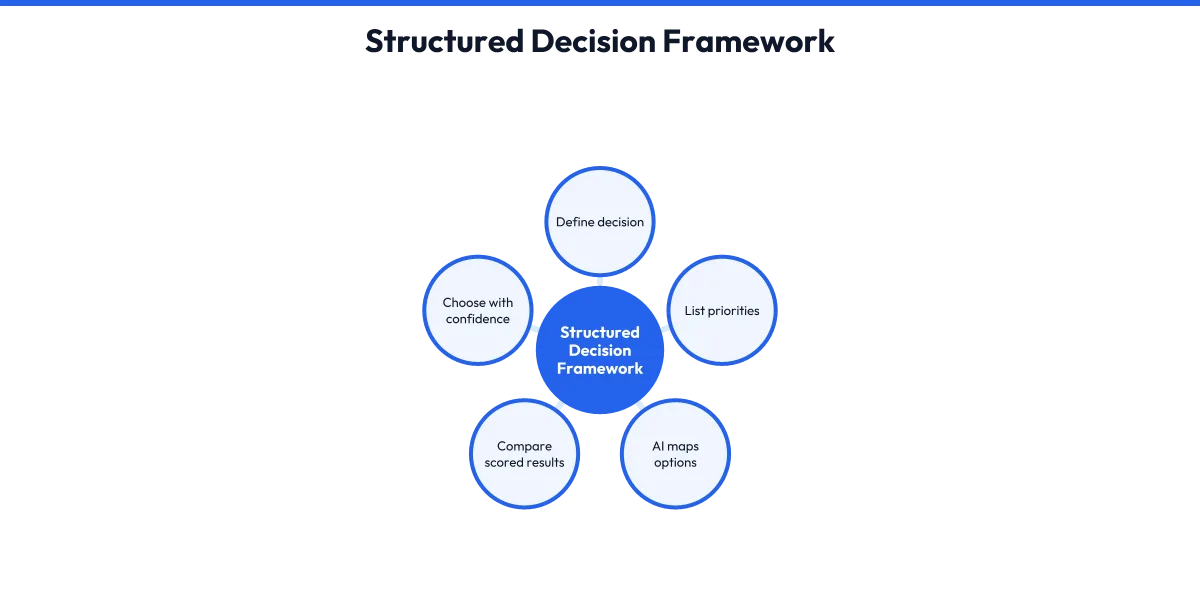
Small business owners make dozens of decisions daily. Many are reversible and low-stakes, but they still drain mental energy. AI can help you decide faster and with more confidence by forcing structure onto messy situations. The simplest method is the pros and cons list, upgraded.
Instead of a basic list, ask AI:
Copy thisI am deciding between [option A] and [option B]. My top priorities are [factors]. For each option, list the pros, cons, and one hidden risk I might not see. Then recommend one option and explain why.
This beats a basic list because it surfaces risks you have not considered and forces a recommendation you can agree or disagree with. Disagreeing with AI's recommendation often clarifies what you actually want. Another method: the pre-mortem. Ask AI:
Say thisI am about to [decision]. Imagine it is six months later and this failed. What are the three most likely reasons why?
This reveals blind spots while you can still change course. For complex decisions with multiple factors, use a simple scoring approach. List your criteria, weight them informally, and ask AI to create a comparison table. You fill in the scores based on your judgment.
AI does the math and highlights trade-offs. You retain full ownership of the decision. AI does not know your risk tolerance, your values, or your gut feel. It knows patterns. Use it to structure your thinking, not replace it.
The clarity comes from the process, not the tool. Try this today. Pick one decision you have been postponing. Run it through one of these three methods. Notice whether having a structured output makes the choice feel easier or reveals what you actually wanted all along.
Action steps- Pick one pending decision and identify your top three priorities for it.
- Run the decision through either pros-and-cons-plus-risks, pre-mortem, or scored comparison.
- Write down your final choice and one reason the AI output helped or did not.
- For your next big decision, pick the method that felt most useful and use it again.
-
Step 6
Build Your Personal Daily AI Workflow
In shortPull together the previous skills into one repeatable routine the reader can run every workday without overthinking it.
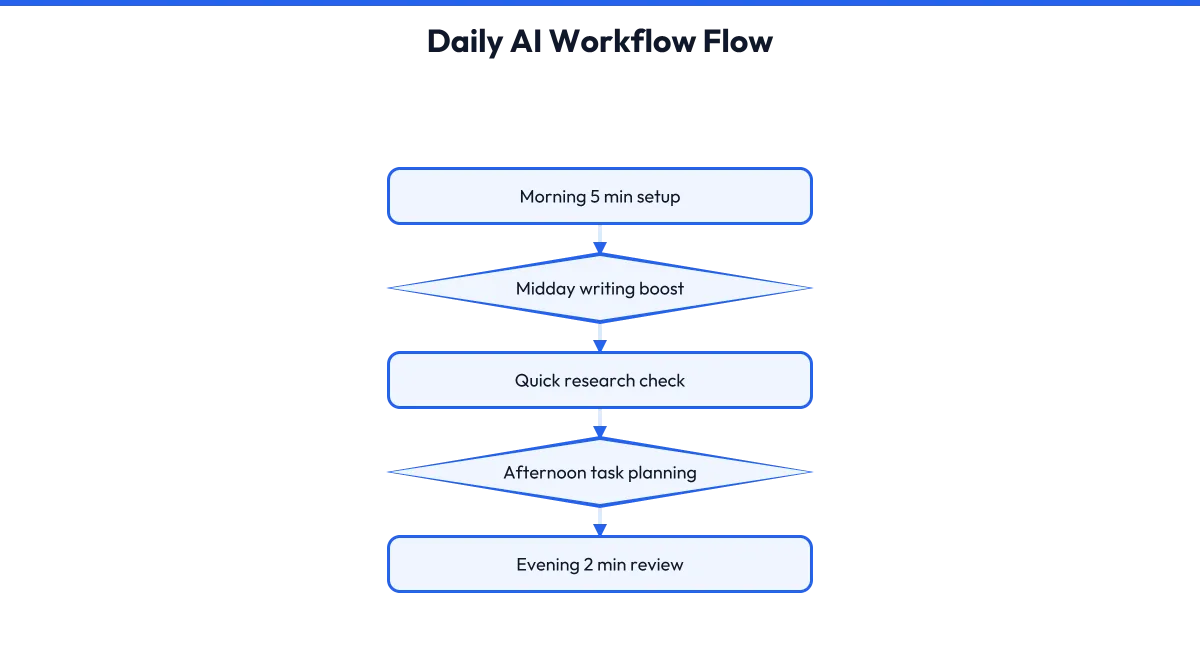
The real power of AI comes from repetition, not one-off experiments. You need a simple daily workflow you can run on autopilot. Here is one that works for most small business owners. It takes ten to fifteen minutes total and covers the five jobs you have learned.
Morning setup, five minutes. Open your AI tool. Ask:
Say thisWhat are three ways AI could help me most today based on these priorities?
List your top two or three tasks for the day. AI will suggest which ones it can assist with and how. This prevents you from defaulting to the same old uses. Writing block, five minutes. Any email, post, or document you need to draft today, run through the context-first formula from Section 2.
Get a draft, edit it, move on. Research or planning block, five minutes. Pick one thing you need to understand better or plan out. Use the methods from Sections 3 and 4. Get a summary, comparison, or plan.
Decision check, two minutes. Any pending choice, run it through your preferred method from Section 5. End-of-day review, two minutes. Ask:
Say thisWhat worked well in how I used AI today? What felt clunky or unhelpful?
Jot one note. This tiny review loop is how you improve week over week. That is it. Fifteen minutes of structured AI use beats an hour of random experimenting. The key is picking the same time each day so it becomes automatic.
Most people find right after morning coffee works best. Your job is not to use AI for everything. Your job is to use it reliably for the right things. Start tomorrow. Set a timer for fifteen minutes. Run through each block with one real task.
Notice how much more intentional your AI use feels compared to opening the tool and hoping for inspiration.
Action steps- Choose a consistent fifteen-minute block for your daily AI workflow.
- Tomorrow, run through all five workflow blocks with real tasks.
- After one week, review which blocks produced the most value.
- Adjust the time spent on each block based on your actual work patterns.
-
Step 7
Common Mistakes That Waste Your Time
In shortHelp the reader recognize and avoid the biggest pitfalls that make AI feel useless or create extra cleanup work.
Even with a good workflow, certain habits will sabotage your results. Knowing them in advance saves frustration. Mistake one: copy-pasting without reading. AI output looks polished. It has perfect grammar and confident tone. That does not mean it is accurate or appropriate.
Always read before you use. Check for made-up facts, outdated references, and tone that does not sound like you. Mistake two: asking for too much at once. "Write my entire business plan" produces generic fluff. "Write the executive summary for a business plan about a mobile dog grooming service in suburban areas" produces something you can actually work with.
Break big requests into smaller, specific ones. Mistake three: no follow-up. The first response is rarely the best. Treat AI like a conversation. Ask for changes, examples, shorter versions, or different angles. Most people leave 80 percent of the value on the table by not iterating.
Mistake four: using AI for sensitive information without checking privacy settings. Do not paste client contracts, employee records, or proprietary data into AI tools unless you understand how that tool handles data. When in doubt, anonymize. Replace real names with placeholders and remove identifying details.
Mistake five: giving up after one bad experience. AI tools vary in quality by task. A clunky result on one request does not mean the tool is useless. It often means your prompt needed more context or your follow-up was missing.
Review these mistakes once a month. Ask yourself which one you fell into most often. That awareness alone will improve your results faster than any new technique.
Action steps- Review your last three AI conversations. Did you copy-paste without editing?
- Pick one big request you made recently and break it into two smaller, more specific ones.
- Check your AI tool's privacy settings or terms to understand how your data is handled.
- Schedule a monthly five-minute review of which mistake you made most often.
-
Step 8
Level Up Your Results Without Learning Advanced Techniques
In shortShow the reader how small refinements to their basic approach yield dramatically better output without requiring technical prompt engineering.
You do not need to become a prompt engineer to get great results. You need three small upgrades to what you are already doing. Upgrade one: assign a role. Start your prompt with "Act as a [relevant expert]." For example: "Act as a marketing consultant who specializes in helping trades businesses get more repeat customers." This frames the AI's knowledge around your specific situation.
It is not magic, but it nudges the output toward more relevant examples and language. Upgrade two: specify format. Instead of "give me ideas," say "give me five ideas, each one sentence long, ranked by how fast I could implement them this week." Format constraints force useful structure.
Upgrade three: ask for what to avoid. Add: "Avoid generic advice, buzzwords, and suggestions that require a big budget." This eliminates the fluff you would otherwise delete. Combine these three upgrades and your basic prompts become significantly more powerful.
Here is a before and after. Before: "How do I get more customers?" After:
Try thisAct as a marketing consultant for local service businesses. I run a house cleaning company with two employees. Give me three ways to get more customers this month, each doable in under five hours. Avoid ideas that require paid ads or complex technology.
The after version will give you specific, actionable suggestions you can actually evaluate. Practice one upgrade per day this week. Notice which one improves your results most. Double down on that one. You are building a personal style of working with AI, not following someone else's script.
Action steps- Take one prompt you used this week and rewrite it with a specific role.
- Add a format constraint to your next request.
- Add one 'avoid this' instruction to your next request.
- Notice which upgrade helps most and use it consistently for two weeks.
Recommended Resource
- AI Affiliate Profit Pages Skool
AI Affiliate Profit Pages Skool

Keep this page handy. Bookmark this page so you can come back to your product and downloads anytime.
Resources and Recommended Tools
- AI Affiliate Profit Pages Skool
AI Affiliate Profit Pages Skool
Prefer an offline copy?
AI at Work
A Simple Daily System for Smarter Business Tasks
Report · Downloadable PDF